I Rented a GPU for 50 Cents an Hour Before Buying One
I've got a tight budget to spend on a box that runs a local AI for my homelab, and I'm nervous about spending it wrong. GPUs are expensive, the advice online is all over the place, and most of it is about someone else's setup. So before buying anything, I tried to find out what my own setup would do.
What I actually want
Over the last year my homelab has turned into a pile of dashboards. Finances, documents, notes, monitoring tools, and Home Assistant.
What I want is a chatbot that knows about all of it, plus a voice assistant for the whole house that answers quickly. The trouble is that spec sheets and benchmarks don't tell you whether a model will be any good at your stuff. A leaderboard score says nothing about whether it can read my notes, run my containers, or know not to unlock the front door when I only asked about it. Home Assistant makes the voice side practical, because its Assist API hands a language model only the devices you've chosen to expose, as tools it can call.
Building tests that fit my life
So I did the opposite of reading benchmarks. Working with Claude, I wrote my own test cases out of the things I'd really ask my house and my homelab, and I filled them with made-up data shaped like mine. Claude wrote most of the test code, and the best part was having something to argue with when the results came in.
That one idea ended up driving everything else. Instead of asking "which model is best?", I could ask "which model is best at the jobs I'm going to give it?" Those turned out to be different questions.
Picking the model
I narrowed things down cheapest-first. I started by running the tests against a handful of models through hosted APIs, which costs next to nothing and lets you compare quickly without owning any hardware: Qwen3.8-27B, a couple of Qwen3.5 sizes, GPT-OSS-20B, and Gemma 4 26B-A4B. I used OpenRouter for this, which also lets you restrict which compression level a provider serves. That matters, since its docs warn that quantized models "may exhibit degraded performance for certain prompts."
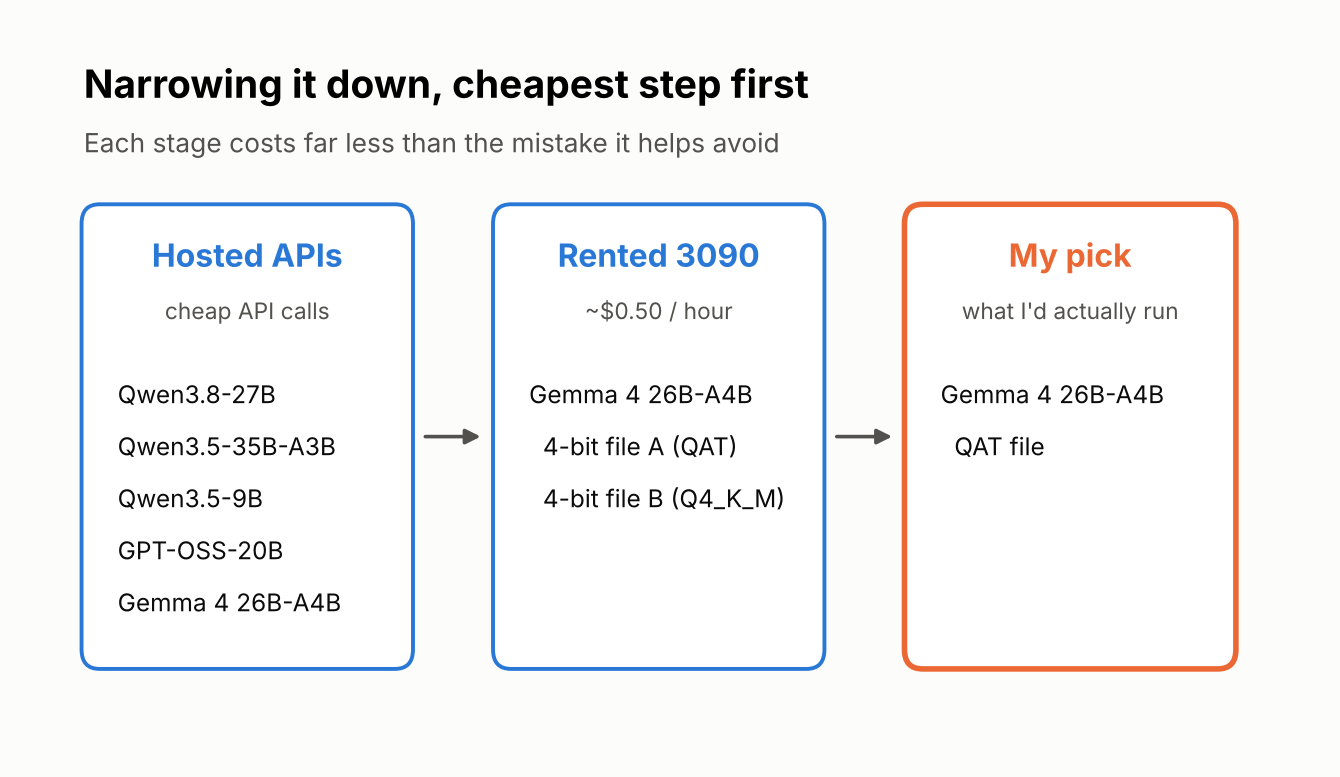
Gemma 4 26B-A4B came out on top for the voice side, and it also happens to suit the hardware. It's a "mixture of experts" model, so only around 4 billion of its 26 billion parameters do work on any given word. In practice that means it answers fast while still fitting on a single consumer card. (Google's Gemma docs point out that all 26 billion parameters still have to sit in memory, which is why the compressed versions matter, and the Ollama listing shows the 26B files at 16 to 19 GB.) For a house that has to respond in a couple of seconds, speed mattered a lot, and it was the best fit of the models I tried.
Then came a detail I wouldn't have thought to check. The same model is sold in different compressed (4-bit) versions, and I tested two of them. One, labeled QAT, was trained with the compression in mind, which Google says minimizes quality loss. The other, Q4_K_M, is compressed after training. They behaved differently.
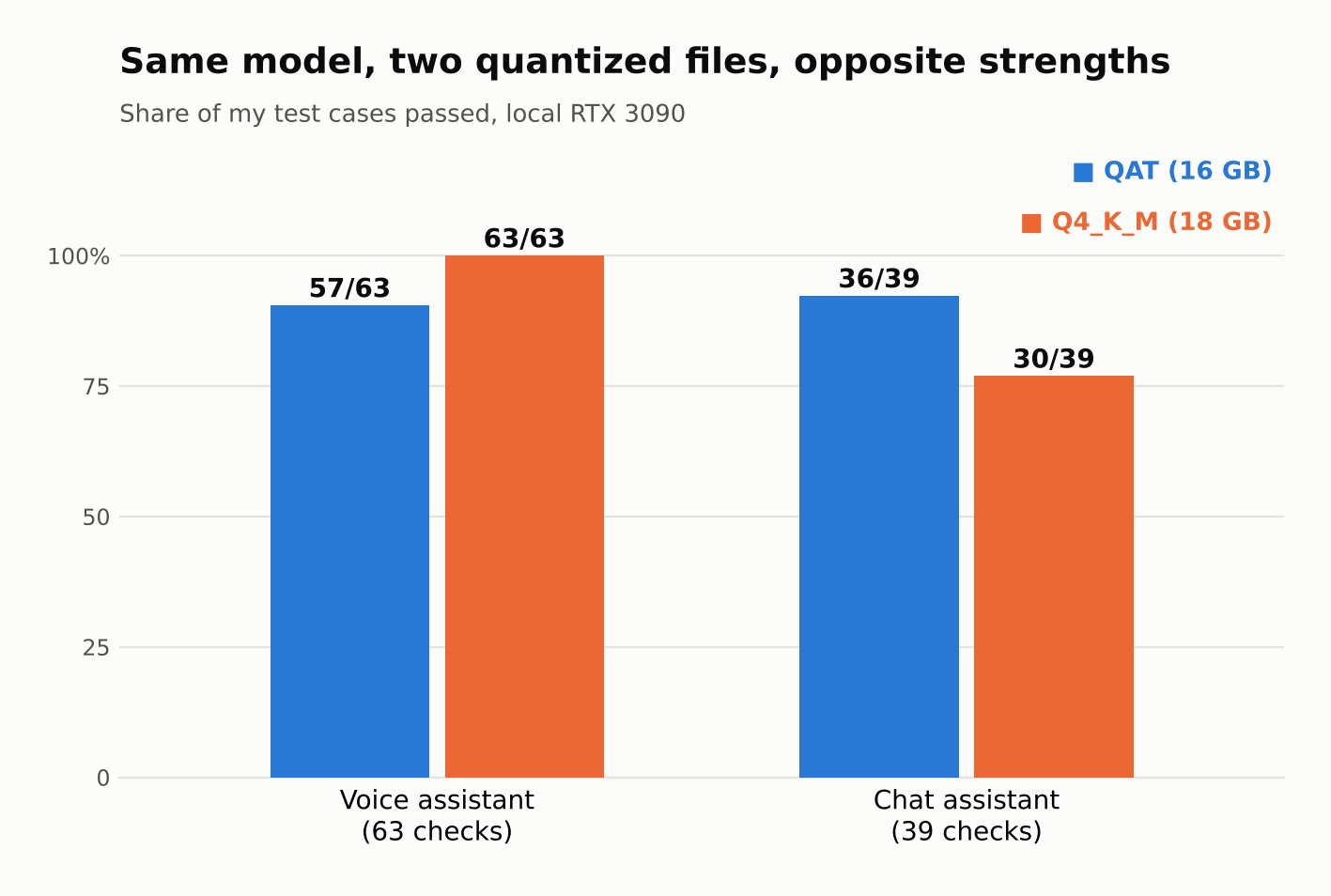
One was perfect at voice but worse at the chat side, including a case where it fixed half of a broken service and then said nothing. The other was a little less polished at voice but much more dependable at the things I'd actually trust it with. I went with the dependable one, because a bot that quietly does half a job is worse than one that's a bit clunky.
Then I rented the card
For hardware, I had my eye on a used RTX 3090. RunPod lists one at about fifty cents an hour, so I rented one and ran the model on it with Ollama. Ten hours of testing would be around five bucks, and the answers would come from the exact card I might end up owning.
Once it was running properly, the picture was encouraging. The model used about 16.7 GB of the card's 24 GB with a long context window, and ran at around 79 tokens a second. A typical voice command finished in about 2.4 seconds. So one card can plausibly do both jobs, which was the thing I most wanted to know.
The tests caught what I'd have missed
My favorite result came from a plain question about my spending. I asked how much I'd put toward one category over a few months, and one version of the model gave a different answer every time I asked, each delivered with total confidence and each nowhere near the real figure.
Imagine finding that out six months from now, after I'd started trusting it with my actual finances. Finding it on fake data first is exactly why I did all this. And a couple of times the mistake was in my own tests, which I only caught by reading the actual answers instead of trusting the score.
What changed in my plan
Almost none of the problems would be fixed by a bigger GPU. They're things the code around the model has to handle, like asking before unlocking a door and retrying when a service hiccups. So the plan on the table is one 3090-class box for both jobs, and the money I'd have put toward a fancier card can go toward getting that surrounding stuff right.
It's worth saying what this doesn't prove. The data was fake, each question ran only a few times, and it was one afternoon. I haven't tried microphones or a speaker in a real kitchen yet.
Still, I'm glad I did it this way. If you're about to spend real money on hardware for something you've got in mind, write down what you'd actually do with it, turn that into tests, and rent the machine for an evening first. Five dollars is a cheap way to find out you were about to buy the wrong thing.
References
- Home Assistant: LLM API (Assist): how Assist exposes chosen devices to a language model as tools.
- OpenRouter: Provider selection: routing between providers and filtering by quantization.
- Gemma core models documentation, Google AI for Developers: the Gemma 4 26B A4B mixture-of-experts design and its memory needs.
- Gemma 4 on Ollama: model sizes, download sizes, and the 26B A4B variant.
- Gemma 4 QAT models, Google: what quantization-aware training is and why Google uses it.
- RunPod GPU pricing: the hourly rate for an RTX 3090 (checked October 2026; prices change).
- Ollama: the tool I used to run the model locally.